
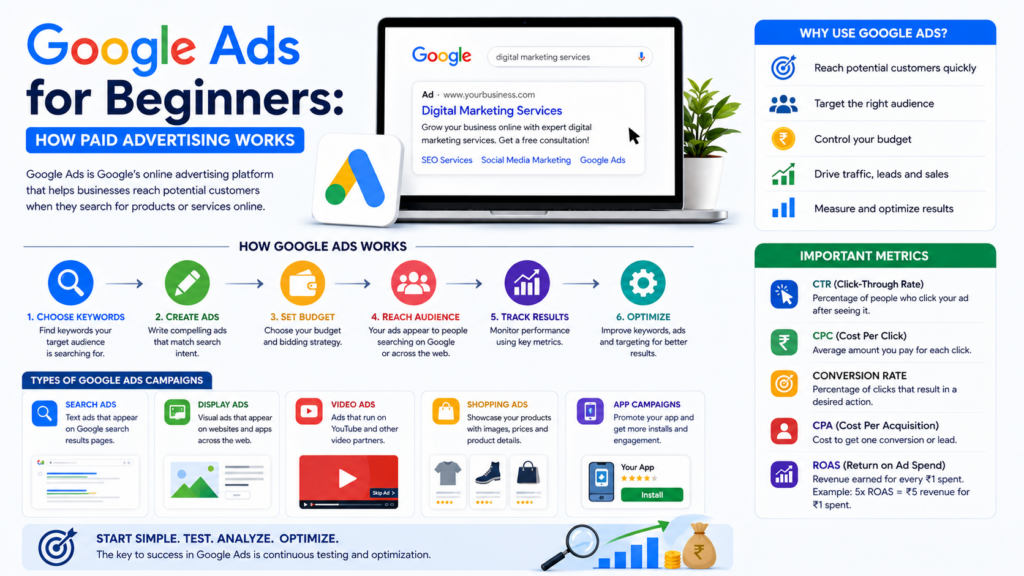
If you want to reach potential customers quickly, Google Ads can be a powerful part of your digital marketing strategy. It allows businesses to promote their products and services when people are actively searching for related information, products, or services online.
For beginners, Google Ads may seem complicated at first. However, understanding the basic concepts can make it much easier to get started.
What Is Google Ads?
Google Ads is an online advertising platform that allows businesses to create paid advertisements across Google’s advertising network.
Businesses can use Google Ads to promote their websites, products, services, apps, and other offerings. Depending on the campaign type, ads can appear in places such as Google Search, YouTube, and other Google partner properties.
The main advantage is that businesses can reach people based on factors such as their searches, interests, location, and other relevant signals.
How Does Google Ads Work?
Google Ads generally works through an auction system. When someone performs a search that may trigger an ad, eligible advertisers compete for available ad placements.
The position and eligibility of an ad are influenced by several factors, including the advertiser’s bid, ad quality, relevance, and other auction signals.
A simple process looks like this:
Choose Keywords → Create Ads → Set Budget → Reach Audience → Track Results → Optimize Campaign
Why Use Google Ads?
Google Ads can provide several benefits for businesses:
- Reach potential customers quickly
- Target specific audiences
- Control advertising budgets
- Drive relevant website traffic
- Generate leads and sales
- Measure campaign performance
- Test different advertisements and landing pages
Unlike organic SEO, which can take time to build visibility, paid search advertising can provide opportunities to appear in search results soon after campaigns are launched.
Types of Google Ads Campaigns
Google offers different campaign types designed for different marketing objectives.
1. Search Ads
Search ads are text-based advertisements that can appear when people search for relevant keywords on Google.
For example, someone searching for “digital marketing services” may see ads from businesses offering those services.
Search campaigns are especially useful for reaching people who already have a specific search intent.
2. Display Ads
Display advertising uses visual ads that can appear across websites and apps within Google’s advertising network.
Display campaigns can be useful for building awareness and reaching audiences beyond search results.
3. Video Ads
Video advertising allows businesses to promote their products or services through video placements, including on YouTube.
Video ads can be useful for brand awareness, product demonstrations, education, and storytelling.
4. Shopping Ads
Shopping ads can showcase products with details such as product images, names, and prices. They are particularly useful for e-commerce businesses looking to promote products to shoppers.
5. App Campaigns
Businesses with mobile applications can use app-focused campaigns to encourage users to install or engage with an app.
What Are Keywords in Google Ads?
Keywords are words or phrases that help advertisers connect their ads with relevant searches.
For example, a digital marketing company might target keywords such as:
- Digital marketing services
- SEO services
- Social media marketing
- Google Ads services
- Online marketing agency
The goal is not simply to choose keywords with high search volume. Keywords should also be relevant to the business, audience, and campaign objective.
Understanding Google Ads Match Types
Keyword matching helps advertisers control how closely a user’s search needs to relate to a keyword.
Common match types include:
- Broad match
- Phrase match
- Exact match
Choosing appropriate match types can help businesses balance reach and relevance.
What Is a Google Ads Budget?
A Google Ads budget determines how much a business is willing to spend on advertising.
Advertisers can set budgets based on their campaign goals and available resources. Actual costs depend on factors such as competition, targeting, bids, and user interactions.
Starting with a manageable budget and gradually increasing spending based on performance can be a practical approach for beginners.
Important Google Ads Metrics
Tracking performance is essential for successful PPC marketing.
Some important metrics include:
CTR – Click-Through Rate
CTR shows how frequently people click an ad after seeing it.
CPC – Cost Per Click
CPC represents the amount paid for a click, with actual costs varying by auction and campaign factors.
Conversion Rate
Conversion rate measures the percentage of relevant visitors or interactions that result in a desired action, such as a purchase or lead.
CPA – Cost Per Acquisition
CPA helps measure how much it costs to generate a conversion.
ROAS – Return on Ad Spend
ROAS compares the revenue attributed to advertising with the amount spent on those ads.
For example, a 5x ROAS means that ₹5 in attributed revenue was generated for every ₹1 spent on advertising, assuming the same currency and attribution basis.
Google Ads vs SEO
Google Ads and SEO can work together as part of a complete search marketing strategy.
Google Ads focuses on paid visibility, while SEO focuses on improving organic search visibility.
A simple comparison:
| Google Ads | SEO |
|---|---|
| Paid advertising | Organic search optimization |
| Can generate visibility quickly | Usually requires time to build |
| Requires ongoing ad spend | No direct payment for each organic click |
| Strong control over targeting | Focuses on content, relevance, and website quality |
| Useful for immediate campaigns | Useful for long-term organic growth |
Using both approaches can help businesses build a more balanced online marketing strategy.
Simple Google Ads Strategy for Beginners
If you are new to Google Ads, follow these basic steps:
1. Set a clear goal
Decide whether you want leads, sales, website traffic, or brand awareness.
2. Identify your target audience
Understand who your potential customers are and what they are searching for.
3. Research relevant keywords
Choose keywords that closely match your products or services.
4. Create relevant ads
Write clear ad copy that matches the user’s search intent.
5. Optimize your landing page
Make sure the landing page is relevant, easy to navigate, mobile-friendly, and focused on the desired action.
6. Set a realistic budget
Start with a budget you can manage and adjust based on performance.
7. Track conversions
Measure valuable actions such as purchases, form submissions, calls, or sign-ups.
8. Optimize regularly
Review campaign data and improve keywords, ads, targeting, bids, and landing pages.
Common Google Ads Mistakes to Avoid
Beginners often make mistakes that can reduce campaign performance. Avoid:
- Targeting irrelevant keywords
- Writing unclear advertisements
- Ignoring negative keywords
- Sending all traffic to an unrelated landing page
- Failing to track conversions
- Focusing only on clicks instead of business results
- Spending without regularly reviewing performance
- Using the same strategy for every campaign
Final Thoughts
Google Ads can be an effective tool for businesses that want to reach potential customers through paid online advertising. The key to successful PPC marketing is not simply spending more money. It is about targeting the right audience, choosing relevant keywords, creating useful ads, optimizing landing pages, and measuring meaningful results.
For beginners, start with clear goals, a manageable budget, and a focused campaign. As you collect performance data, continue testing and optimizing your strategy.
When combined with SEO, social media marketing, content marketing, and other digital marketing channels, Google Ads can become an important part of a strong online marketing strategy.
Frequently Asked Questions
What is Google Ads?
Google Ads is Google’s online advertising platform that allows businesses to create paid campaigns to promote their products, services, websites, apps, and other offerings.
Is Google Ads good for beginners?
Yes. Beginners can start with focused campaigns, clear goals, a manageable budget, and basic knowledge of keywords, ad copy, targeting, and conversion tracking.
How much does Google Ads cost?
There is no single fixed cost. Advertising costs depend on factors such as competition, keywords, targeting, bids, campaign settings, and user interactions.
What is PPC marketing?
PPC stands for Pay-Per-Click. It is an advertising model where advertisers generally pay when users click on their ads.
Is Google Ads better than SEO?
Neither is universally better. Google Ads can provide paid visibility, while SEO can build organic visibility over time. Many businesses use both as part of their overall digital marketing strategy.